Trusted by 10,000+ YouTube creators · Updated March 2026
YouTube Analytics Features to Grow Your Channel
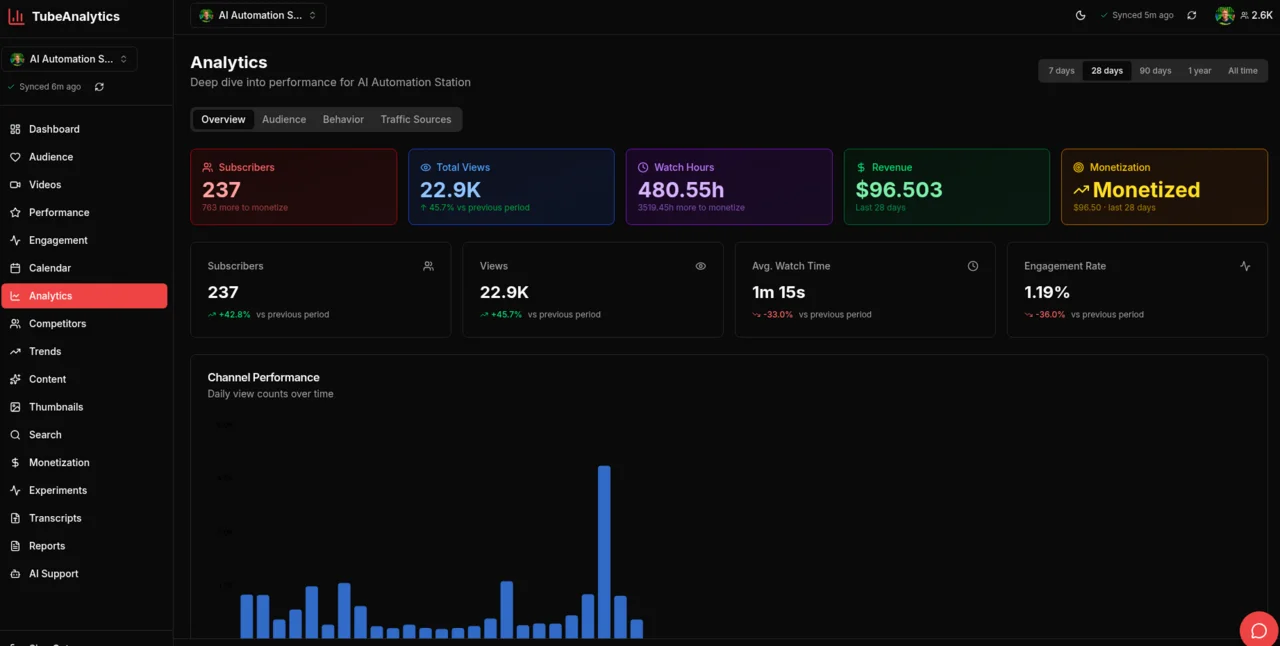
TubeAnalytics is a YouTube analytics suite that helps creators track performance, understand audiences, compare competitors, test thumbnails, and optimize revenue in one place. For source notes and metric definitions, see our methodology and glossary.
Plans from $19/month
Deep Video Analytics
Starter+Every metric, for every video, in one place
Know within the first 48 hours whether a video will hit your channel average — and why.
Deep Video Analytics is TubeAnalytics' video-level reporting tool that tracks view velocity, engagement heatmaps, and performance forecasting for every video on your channel. Unlike basic view counts, it shows exactly how content performs from the first hour through long-tail discovery — so you can double down on what's working and cut what isn't.
Guide: How to read your video analyticsKey Capabilities
- Real-time view velocity tracking for first 48 hours
- Engagement heatmaps showing exactly where viewers drop off
- Performance forecasting based on historical patterns
- Video-over-video comparison to identify what works
- CTR tracking with historical benchmarks
- Watch time analysis by traffic source
Audience Intelligence
Starter+Know your viewers better than they know themselves
Upload at the right time, for the right audience, and watch your average view duration improve.
Understand who watches your content, where they come from, and what keeps them engaged. TubeAnalytics maps demographics, retention curves, geographic distribution, and interest categories to help you create content your audience loves. According to YouTube, channels that consistently match content to audience interest see 2–3× higher subscriber retention.
Guide: Understanding your audience demographicsKey Capabilities
- Demographic breakdowns by age, gender, and location
- Audience retention curves for every video
- Geographic revenue analysis — see which markets are most valuable
- New vs. returning viewer tracking
- Peak activity heatmaps for optimal upload scheduling
- Interest category mapping to find content opportunities
Competitor Tracking
Professional+Learn from the market, then outperform it
Find the content gaps your competitors are missing — and fill them before they do.
Competitor Tracking is a channel benchmarking tool that monitors up to 20 YouTube channels simultaneously, surfacing upload patterns, view trends, and content gaps across your niche. Track engagement rates and content strategy for any public channel. Identifying what competitors haven't covered — and publishing those videos first — is one of the most consistent growth patterns across creator categories.
Guide: How to do competitor analysis on YouTubeKey Capabilities
- Track up to 20 competitor channels
- Upload cadence and consistency analysis
- View trend comparison across channels
- Engagement rate benchmarking
- Content gap analysis — find topics competitors haven't covered
- Weekly competitor activity reports delivered to your inbox
Trend Discovery
Professional+Get ahead of the algorithm, not behind it
Publish on a rising topic 2–3 weeks early and capture the wave as it peaks.
Trend Discovery is TubeAnalytics' content intelligence module that identifies emerging topics in your niche before they peak. The platform analyzes search trends, rising keywords, and viral content patterns to surface opportunities while they're still early. Timing matters: based on TubeAnalytics platform data, videos published during a trend's early rise earn 40–60% more views on average than those published at peak.
Blog: Finding trending topics before they peakKey Capabilities
- Niche-specific trend detection and alerts
- Rising keyword identification with momentum scores
- Viral content pattern recognition
- Seasonal trend forecasting
- Content idea generation based on trending topics
- Search demand analysis for your niche
AI Thumbnail Testing
EnterpriseStop guessing which thumbnail will perform
Test thumbnails before publishing and improve your CTR without burning impressions.
Upload thumbnail variants and let AI score their CTR potential before you publish. Our model analyzes face detection, text clarity, color contrast, and composition to predict which thumbnail will drive the most clicks. A 1% improvement in CTR can double impressions delivered by the YouTube algorithm — thumbnail decisions are among the highest-leverage choices a creator makes.
Blog: How to improve your YouTube thumbnail CTRKey Capabilities
- AI-powered CTR prediction scoring
- Face detection and expression analysis
- Text readability scoring at thumbnail sizes (e.g., mobile)
- Color contrast and composition analysis
- A/B testing with statistical significance tracking
- Historical thumbnail performance tracking
Revenue Optimization
Professional+Maximize every view's earning potential
Shift more content toward high-CPM topics and geographies to increase revenue without more views.
Revenue Optimization is TubeAnalytics' monetization analytics module that tracks CPM, RPM, ad type performance, sponsorship revenue, and geographic revenue distribution. Get actionable recommendations to increase earnings per view and diversify income streams. Geography matters significantly: according to YouTube Creator Academy data, US, UK, and Australian viewers generate 3–5× higher CPM than viewers in most other markets.
Blog: Maximizing YouTube ad revenueKey Capabilities
- CPM and RPM tracking by video, geography, and time
- Ad type performance breakdown
- Revenue forecasting based on historical data
- Geographic revenue optimization recommendations
- Sponsorship and membership revenue tracking
- Revenue per content category analysis
Video Transcripts
Professional+Download and analyze every word
Turn one video into a blog post, a Twitter thread, and five social clips — without re-watching.
Video Transcripts gives you full, timestamped transcripts for every video on your channel — downloadable as plain text or formatted with timestamps for repurposing into blogs, newsletters, and social media. Repurposing video content into written formats can drive an additional 20–30% of traffic from Google Search, according to YouTube's own content guidance — an often-overlooked distribution channel for creators.
Blog: How to get more from your YouTube contentKey Capabilities
- Full video transcripts with timestamps
- Download as plain text or timestamped format
- Content repurposing for blogs and social media
- SEO keyword research from your own content
- Word count and character statistics
- Batch transcript processing
SEO Tools
EnterpriseGet discovered in YouTube search
Rank for the keywords your audience is actively searching — before your competitor does.
Optimize your videos for YouTube search with keyword research, tag suggestions, and SEO scoring. Understand what viewers are searching for and tailor your content to match demand. YouTube is the second-largest search engine in the world, and organic search traffic converts to subscribers at significantly higher rates than suggested feed traffic.
Blog: YouTube SEO fundamentalsKey Capabilities
- Keyword research and search volume data
- Tag suggestions based on top performers
- SEO scoring for video titles and descriptions
- Competitor keyword analysis
- Trending search terms in your niche
- Optimization recommendations with actionable steps
Content Calendar
Starter+Plan, schedule, and visualize your content
Publish on a consistent schedule and signal to the algorithm that your channel is active.
Plan your content strategy with a visual calendar. See your upcoming videos, track upload schedules, and maintain consistency with a clear overview of your content pipeline. YouTube's own Creator Academy recommends consistent upload schedules as one of the top factors in sustained channel growth.
Guide: Building a sustainable content calendarKey Capabilities
- Visual calendar view of scheduled content
- Drag-and-drop scheduling
- Upload date reminders
- Content type categorization
- Consistency tracking and analytics
- Multi-channel calendar support
AI Content Ideas
EnterpriseNever run out of content ideas
Generate a month of video ideas in minutes — tailored to your niche and your audience's interests.
Get AI-powered content recommendations tailored to your channel. Generate video ideas, titles, descriptions, and outlines based on trends, audience interests, and successful formats. The AI is trained on your channel's historical performance, so suggestions are grounded in what your specific audience responds to.
Blog: Using AI for YouTube content planningKey Capabilities
- AI-generated video ideas based on your channel trends
- Title and description suggestions with SEO scoring
- Audience interest analysis
- Trending topic recommendations
- Content format suggestions (tutorial, reaction, list, etc.)
- Script outline generation
AI Support Assistant
Starter+Get instant answers to your questions
Ask any question about your channel data and get a plain-English answer in seconds.
Chat with an AI assistant trained on YouTube analytics best practices. Get answers to questions about your channel, recommendations for improvement, and insights into your performance — without needing to interpret raw numbers yourself. Available 24/7 and aware of your channel's specific context.
Key Capabilities
- Instant answers to analytics questions
- Personalized recommendations based on your data
- Performance insights and improvement tips
- Strategy advice grounded in your channel history
- 24/7 availability — no waiting for support tickets
- Context-aware responses that know your channel
Video Performance Scores
Starter+Score every video's performance at a glance
Identify your top 20% of videos and replicate the patterns that made them successful.
Get comprehensive performance scores for all your videos. Compare scores across videos, identify patterns in high-performing content, and make data-driven decisions about your content strategy. The 80/20 rule applies strongly to YouTube: for most channels, 20% of videos drive 80% of total views.
Key Capabilities
- Overall performance scoring relative to your channel average
- Engagement score breakdown (CTR, AVD, likes, comments)
- CTR and retention analysis with context
- Video-over-video comparison
- Historical score tracking over time
- Improvement recommendations per video
Topic Experiments
EnterpriseTest content topics with data-driven experiments
Discover which content categories drive the most subscribers — not just views — for your channel.
Run controlled experiments on your content topics to identify what drives the most growth. Compare topic performance across revenue, watch time, subscribers, and reach to optimize your content strategy. What drives views isn't always what drives subscribers or revenue — this feature separates those signals clearly.
Blog: Data-driven YouTube content strategyKey Capabilities
- AI-powered topic clustering from your video library
- A/B testing framework for content topics
- Multi-metric performance comparison (views, subs, revenue, watch time)
- Statistical significance tracking
- Growth attribution modeling
- Experiment recommendations based on your goals
Built for serious creators
Real-Time Data
Data syncs hourly so your dashboard is always current.
Secure & Private
Read-only API access. We never post on your behalf or share your data.
Historical Data
Up to 5 years of historical data retention on Enterprise plans.
Works Globally
Full support for channels in any language and any country.
TubeAnalytics vs. YouTube Studio
YouTube Studio gives you the basics. TubeAnalytics gives you the competitive edge.
| Feature | TubeAnalytics | YouTube Studio |
|---|---|---|
| Real-time view velocity (first 48h) | ||
| Competitor channel tracking | ||
| AI thumbnail CTR prediction | ||
| Trend discovery (pre-peak) | ||
| Engagement heatmaps | ||
| Revenue by geography | ||
| Audience demographics | ||
| Video transcripts + download | ||
| Content calendar & scheduling | ||
| AI content ideas | ||
| Multi-channel dashboard | ||
| 5-year data retention | ||
| Comment moderation & reply inbox |
Frequently Asked Questions
Common questions about TubeAnalytics features and how they work.
- How does TubeAnalytics connect to my YouTube channel?
- TubeAnalytics connects via Google's official YouTube Data API and YouTube Analytics API using read-only OAuth access. We never request posting permissions. You authorize access through your Google account and can revoke it at any time from your Google security settings.
- How does the AI thumbnail testing work?
- You upload 2–4 thumbnail variants and our AI analyzes each one across multiple dimensions: face detection and expression, text readability at small sizes (including mobile), color contrast, composition balance, and visual hierarchy. Each thumbnail receives a predicted CTR score based on patterns learned from millions of YouTube thumbnails. This happens before you publish, so you're not burning real impressions on a weaker thumbnail.
- Can I track YouTube Shorts with TubeAnalytics?
- Yes. TubeAnalytics tracks all video types including YouTube Shorts, long-form videos, live streams, and premieres. Shorts analytics are displayed separately with Shorts-specific metrics including swipe-away rate and loop count where available from the YouTube API.
- How is revenue data calculated? Is it exact?
- Revenue data is pulled directly from the YouTube Analytics API, which is the same data source YouTube Studio uses. CPM, RPM, and estimated revenue figures match what you see in YouTube Studio. TubeAnalytics adds geographic breakdowns, ad type analysis, and revenue forecasting on top of this base data.
- How many competitor channels can I track?
- The number depends on your plan: Starter allows 5 competitor channels, Professional allows 10, and Enterprise allows up to 20 simultaneous competitor channels. Competitor data is updated weekly and includes upload cadence, view trends, engagement benchmarks, and content topic analysis.
- How much does TubeAnalytics cost?
- Plans start at $19/month for the Starter plan, which includes 1 channel, 90-day data history, and core analytics. The Professional plan is $49/month (3 channels, 1-year history, AI thumbnail testing, competitor tracking). Enterprise is $149/month (5 channels, white-label reports, API access, 5-year data retention).
- How much historical data can I access?
- Historical data availability depends on your plan. Starter plans include 90 days of history, Professional plans include 1 year, and Enterprise plans include up to 5 years. Note that the YouTube API limits how far back we can retrieve historical analytics — we can import your available history when you first connect your channel.
- Does TubeAnalytics work for channels outside the US?
- Yes. TubeAnalytics supports channels in all countries and all languages supported by YouTube. Revenue, CPM, and audience data are all localized. The platform interface is available in English, with additional language support in progress.
- What does 'view velocity' mean?
- View velocity is the rate at which a video accumulates views over time, measured in intervals (hourly for the first 48 hours, then daily). A high view velocity in the first 24–48 hours is one of the strongest signals that YouTube's algorithm will push a video to broader audiences. TubeAnalytics tracks this in real time so you can identify breakout videos quickly.
- How is TubeAnalytics different from YouTube Studio?
- YouTube Studio provides solid baseline analytics for your own channel. TubeAnalytics adds capabilities YouTube Studio doesn't offer: competitor channel tracking, AI thumbnail testing, pre-peak trend discovery, engagement heatmaps, view velocity tracking, multi-channel management, and a 5-year data retention option. See the full comparison table on this page.
Still have questions? Browse our guides or read the blog.
Ready to see your channel differently?
Join 10,000+ creators who use TubeAnalytics to make data-driven content decisions. Start with our getting started guide or get started with a plan from $19/month.
Comment Manager
Professional+Moderate and reply to comments without leaving your dashboard
Respond to every comment in one inbox instead of juggling YouTube Studio tabs — and keep spam off your channel automatically.
Manage your entire comment section from inside TubeAnalytics. View comments across all videos in a unified feed, reply directly, approve or hold comments for review, mark spam, and delete unwanted posts — all without switching to YouTube Studio. Filter by moderation status to triage held-for-review comments quickly, or search for specific threads. Creators who respond to comments within 24 hours consistently see higher algorithmic reach because YouTube treats engagement as a signal of an active community.
Key Capabilities