
O ViralOutlier foi desenvolvido com base em uma premissa específica: o sucesso viral no YouTube segue padrões identificáveis em miniaturas, títulos, ganchos e seleção de tópicos. Ao criar um banco de dados pesquisável desses padrões, ele ajuda os criadores a tomar melhores decisões de pré-produção sobre o que produzir e como apresentar o conteúdo. O TubeAnalytics opera em um ponto diferente do mesmo fluxo de trabalho — conectando-se à API do YouTube Analytics para fornecer dados de desempenho autenticados que mostram o que realmente aconteceu após a publicação: CPM obtido, formato da curva de retenção, CTR das impressões e como a velocidade de visualização de um vídeo se compara à média histórica do seu canal.
De acordo com a Academia de Criadores do YouTube, as estratégias mais eficazes para o crescimento de um canal combinam pesquisa pré-produção com análise sistemática pós-publicação. Esta comparação detalha os pontos fortes de cada ferramenta e qual delas seu canal mais precisa neste momento. Para uma tabela comparativa com os recursos e o veredito, consulte a comparação entre TubeAnalytics e ViralOutlier.
O que é ViralOutlier?
Try it free
Turn your analytics into a repeatable growth strategy
TubeAnalytics surfaces the patterns in your data that tell you what to double down on and what to cut.
ViralOutlier é uma plataforma de pesquisa de conteúdo para o YouTube criada para estudar padrões de vídeos virais. Em vez de se conectar à sua conta do YouTube, ela analisa o que teve bom desempenho em larga escala na plataforma — catalogando as composições de miniaturas, estruturas de títulos, formatos de ganchos, durações de vídeos e abordagens de tópicos que geram picos dramáticos de visualizações em nichos de conteúdo específicos. A premissa central é que o sucesso viral não é aleatório: padrões identificáveis se repetem em conteúdos de alto desempenho, e estudar esses padrões antes da produção oferece aos criadores uma vantagem estratégica sobre as decisões de conteúdo baseadas no instinto. A plataforma inclui um banco de dados de padrões de vídeos virais organizado por nicho, rastreamento de tendências virais em nichos específicos para identificar formatos emergentes antes que se tornem saturados, bibliotecas de fórmulas de miniaturas e títulos para inspiração criativa e ferramentas de análise de tendências para identificar quais categorias de conteúdo estão ganhando força. Os planos começam em aproximadamente US$ 15 por mês. O ViralOutlier não se conecta à sua conta do YouTube e não pode exibir análises privadas do canal.
O que é TubeAnalytics?
O TubeAnalytics é uma plataforma dedicada à análise do YouTube que se conecta à API oficial do YouTube Analytics usando autorização OAuth somente leitura, fornecendo dados privados do canal que ferramentas de pesquisa públicas não conseguem acessar. Essa conexão autenticada fornece CPM e RPM reais por vídeo e região geográfica, tempo de visualização por espectador, curvas de retenção de público momento a momento, CTR de impressões, análises demográficas completas por idade, sexo e localização, além de rastreamento da velocidade de visualização que identifica vídeos de destaque nas primeiras 48 a 72 horas após o upload. O TubeAnalytics foi projetado especificamente para o fluxo de trabalho de análise pós-publicação: medir o desempenho do conteúdo após a publicação, otimizar a receita em diferentes tipos de conteúdo e regiões geográficas, monitorar até 20 canais concorrentes simultaneamente com benchmarks por vídeo e prever o CTR da miniatura com pontuação de IA antes da publicação. Fundado em 2024, oferece planos para criadores a partir de US$ 19/mês com garantia de reembolso de 14 dias.
Como as duas ferramentas se encaixam no ciclo de vida do conteúdo
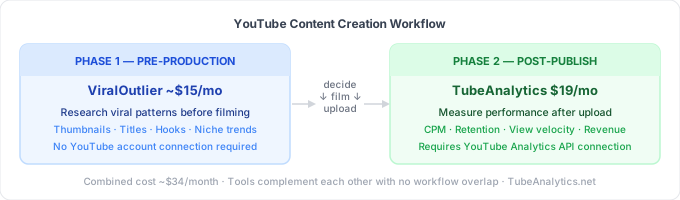
A ViralOutlier serve para a fase de pré-produção. Antes de decidir o que filmar, ela ajuda você a entender que tipos de conteúdo historicamente geraram resultados virais no seu nicho — dando à sua estratégia de conteúdo uma base de dados, em vez de depender do instinto.
O TubeAnalytics atua na fase pós-publicação. Após o upload, ele responde às perguntas: como está o desempenho deste vídeo? Qual foi o CPM gerado por este público? Onde houve perda de visualizações? Este vídeo está se destacando mais rápido do que a média do meu canal? Como minha frequência de uploads se compara à dos meus concorrentes mais próximos?
Criadores que precisam de respostas para ambas as perguntas — o que devo criar em seguida e como foi o desempenho do meu último vídeo — geralmente consideram ambas as ferramentas úteis. Elas abordam diferentes etapas do fluxo de trabalho sem sobreposição significativa.
Que análises a ViralOutlier fornece?
O ViralOutlier trabalha com dados públicos e de pesquisa. Ele não pode exibir o tempo de exibição do seu canal, curvas de retenção de público, CTR de impressões, distribuição demográfica ou métricas de receita — porque esses são dados privados acessíveis apenas por meio de acesso autenticado à API do YouTube, que o ViralOutlier não utiliza.
As análises da ViralOutlier são focadas em padrões: quais miniaturas e títulos impulsionaram o desempenho excepcional em um nicho específico, quais tópicos estão em alta com base nos sinais de velocidade de visualização e quais padrões estruturais aparecem em conteúdos de alto desempenho. Trata-se de inteligência de estratégia de conteúdo, não de mensuração de desempenho de canal.
Análise de Receita: ViralOutlier não possui nenhuma
A ViralOutlier não inclui nenhuma análise de receita. Dados de CPM, RPM e ganhos estão ausentes da plataforma em qualquer formato.
A TubeAnalytics extrai os valores reais de CPM e RPM da API autenticada do YouTube, discriminados por vídeo individual e por região geográfica. De acordo com os dados de CPM de nicho de 2025 do Influencer Marketing Hub, as taxas de CPM variam em até 5 vezes entre os Estados Unidos e mercados com CPM mais baixo para conteúdo idêntico — uma diferença que importa enormemente ao decidir quais segmentos de público priorizar.
O painel de Otimização de Receita do TubeAnalytics exibe essa variação geográfica do CPM diretamente, permitindo que criadores monetizados identifiquem quais tópicos e regiões geográficas do público geram mais receita por visualização. Para um guia detalhado dessas métricas, consulte Entendendo o CPM e o RPM do YouTube.
Padrões Virais vs. Velocidade de Visualização
Ambas as plataformas identificam conteúdo de alto desempenho, mas fazem isso em momentos diferentes e com propósitos distintos.
A pesquisa de padrões virais da ViralOutlier é retrospectiva: ela estuda conteúdo que já demonstrou um desempenho excepcional e extrai os padrões que parecem impulsionar esse sucesso. Isso é mais valioso antes da produção — quando você está decidindo o que produzir em seguida.
O rastreamento da velocidade de visualização do TubeAnalytics é em tempo real e se aplica ao seu próprio conteúdo publicado. Quando um vídeo acumula visualizações significativamente mais rápido do que a média histórica do seu canal nas primeiras 48 a 72 horas, o TubeAnalytics o sinaliza como um potencial destaque — enquanto a janela de distribuição do algoritmo ainda está aberta e a atividade promocional pode potencializar o efeito.
Os dois indicadores respondem a perguntas diferentes: o ViralOutlier pergunta o que funcionou no seu nicho; o TubeAnalytics pergunta se o seu vídeo está funcionando agora.
Monitoramento da concorrência
A ViralOutlier oferece pesquisa de tendências em nível de nicho — mostrando que tipos de conteúdo estão gerando resultados virais em uma categoria de conteúdo — em vez de rastreamento estruturado de concorrentes por canal.
O TubeAnalytics monitora até 20 canais concorrentes específicos simultaneamente em seu painel de Monitoramento de Concorrentes. Para cada canal monitorado, ele exibe a velocidade estimada de visualização por vídeo, a frequência de uploads, as taxas de engajamento de referência e a análise de padrões de conteúdo — possibilitando uma análise competitiva estruturada no nível do canal, em vez do nível do nicho.
Pesquisa de miniaturas vs. previsão de CTR por IA
A biblioteca de miniaturas da ViralOutlier apresenta exemplos de miniaturas de alto desempenho organizados por nicho — um recurso de pesquisa criativa para identificar quais composições e estilos geram taxas de cliques (CTR) excepcionais em uma determinada categoria de conteúdo.
O teste de miniaturas com IA da TubeAnalytics analisa sua imagem de miniatura específica antes da publicação. O modelo avalia a detecção de rostos e expressões emocionais, a legibilidade do texto em miniaturas pequenas, o contraste de cores em relação às miniaturas concorrentes e o equilíbrio da composição — retornando uma taxa de cliques (CTR) prevista e sugestões específicas de melhoria.
Ambos são úteis para decisões diferentes. O ViralOutlier ajuda na direção criativa e na inspiração; o TubeAnalytics prevê se a sua miniatura específica tem probabilidade de ter um bom desempenho. Para mais informações sobre otimização de miniaturas, consulte SEO para miniaturas do YouTube: O Guia Completo.
Preços
O ViralOutlier tem um custo inicial de aproximadamente US$ 15 por mês. O TubeAnalytics tem um custo inicial de US$ 19 por mês — uma diferença de US$ 4 por mês no plano básico. Ambos são acessíveis para criadores independentes.
Para criadores que precisam tanto de pesquisa pré-produção quanto de análises pós-publicação, o custo combinado é de aproximadamente US$ 34/mês — cobrindo todo o ciclo de vida do conteúdo, desde a pesquisa de ideias até a mensuração de desempenho. Criadores que estejam avaliando ferramentas similares de pesquisa de conteúdo também podem achar úteis as comparações TubeAnalytics vs. OutlierKit e TubeAnalytics vs. ViewStats.
Começando
Para começar a monitorar o desempenho do seu canal com dados autenticados do YouTube:
- Conecte seu canal ao TubeAnalytics via OAuth somente leitura — sem necessidade de senhas, revogável a qualquer momento.
- Analise o painel de controle "Velocidade de Visualização" para identificar quais vídeos recentes estão se destacando rapidamente.
- Abra o painel de controle "Otimização de Receita" para ver o CPM e o RPM detalhados por vídeo e região geográfica.
Para mais informações sobre análises de canais do YouTube, consulte YouTube Analytics: The Complete Creator's Guide e The Best YouTube Analytics Tools in 2026.
Perguntas Frequentes
P: O ViralOutlier pode mostrar os dados de receita ou retenção do meu canal do YouTube? Não. O ViralOutlier usa dados públicos e de pesquisa e não se conecta à API do YouTube Analytics. Tempo de exibição, curvas de retenção de público, CTR de impressões, dados demográficos e receita (CPM e RPM) são métricas privadas que exigem acesso autenticado à API para serem exibidas. O TubeAnalytics se conecta ao seu canal por meio da API oficial do YouTube Analytics usando autorização OAuth somente leitura e mostra seus dados de desempenho privados reais.
P: O que é "pesquisa de padrões virais" e como a ViralOutlier a aplica? A pesquisa de padrões virais envolve o estudo sistemático de vídeos que superaram drasticamente a média de visualizações do canal — identificando estilos comuns de miniaturas, fórmulas de títulos, estruturas de gancho, durações de vídeos e abordagens de tópicos que parecem impulsionar um desempenho excepcional em um nicho específico. A ViralOutlier cria um banco de dados pesquisável desses padrões por nicho, permitindo que os criadores apliquem o que já funcionou em seus próximos vídeos antes da produção. O TubeAnalytics mede um sinal relacionado de forma diferente — seu rastreamento de velocidade de visualização identifica quais dos seus vídeos já publicados estão apresentando um desempenho excepcional em tempo real, nas primeiras 48 a 72 horas após o upload.
P: Posso usar o TubeAnalytics e o ViralOutlier ao mesmo tempo? Sim — as ferramentas atendem a diferentes etapas do fluxo de trabalho de conteúdo, sem sobreposição significativa. O ViralOutlier informa o que criar, revelando padrões virais e pesquisas criativas antes da produção. O TubeAnalytics mede o desempenho real do conteúdo publicado — velocidade de visualização, curvas de retenção, CTR, receita e benchmarks da concorrência. Juntos, eles custam aproximadamente US$ 34/mês e cobrem todo o ciclo de vida, da pesquisa à análise.
P: Qual ferramenta é melhor para otimizar miniaturas do YouTube? Depende da etapa da decisão. O ViralOutlier oferece uma biblioteca de miniaturas de alto desempenho por nicho — útil para pesquisa criativa e para se inspirar no que funcionou em outros lugares. O TubeAnalytics usa IA para avaliar sua imagem de miniatura específica antes da publicação, retornando uma CTR prevista com base na visibilidade do rosto, legibilidade do texto, contraste de cores e composição. O ViralOutlier é melhor para direção criativa; o TubeAnalytics é melhor para validar seu design específico antes de publicá-lo.
P: O ViralOutlier é melhor que o TubeAnalytics para estratégia de conteúdo na pré-produção? Sim — o ViralOutlier foi desenvolvido especificamente para o fluxo de trabalho de pesquisa na pré-produção. Seu banco de dados de padrões virais, rastreamento de tendências de nicho e bibliotecas de fórmulas de miniaturas e títulos ajudam os criadores a tomar decisões mais informadas sobre o que criar antes de investir tempo de produção. O TubeAnalytics exibe alertas de tendências em seu painel de Tendências, mas é uma plataforma de análise — não uma ferramenta de ideação de conteúdo. Para criadores cujo gargalo é descobrir o que criar em seguida, o ViralOutlier é a plataforma mais adequada para essa etapa.
Decision Rule
If the advice in TubeAnalytics vs. ViralOutlier: Pesquisa de Padrões Virais vs. Análise de Canais Autenticada does not change the next decision you would make, do not scale it.
Practical Next Step
- Define the decision: Decide what you are trying to improve before applying the advice in TubeAnalytics vs. ViralOutlier: Pesquisa de Padrões Virais vs. Análise de Canais Autenticada.
- Apply one change: Use one recommendation from this article on a single video, topic, or workflow step.
- Review the outcome: Compare the result with your baseline before deciding whether to scale it.