TubeAnalyticsข้อมูลเชิงลึกสำหรับครีเอเตอร์

Features

TubeAnalytics เป็นแพลตฟอร์มการวิเคราะห์ของ YouTube ที่จัดกลุ่มฟีเจอร์ตามการตัดสินใจที่คุณต้องการ ใช้การเพิ่มประสิทธิภาพรายได้เพื่อรายได้ การติดตามคู่แข่งเพื่อหาช่องว่าง การทดสอบภาพขนาดย่อของ AI สำหรับ CTR ระบบ Audience Intelligence สำหรับการวิจัยของผู้ดู และการวิเคราะห์วิดีโอเชิงลึกเพื่อการวินิจฉัย

Plans from $19/month

Last reviewed for factual accuracy on: June 1, 2026 by Mike Holp.

Filter features by task
Starter+

การวิเคราะห์วิดีโอ YouTube

วิเคราะห์วิดีโอแต่ละรายการด้วยข้อมูลช่องที่เชื่อมต่อ

Key capabilities

ตรวจสอบเวลาในการดูที่ได้รับการรับรอง ระยะเวลาการดูโดยเฉลี่ย การมีส่วนร่วม ผลกระทบของสมาชิก การรักษาผู้ชม และแหล่งที่มาของการเข้าชมวิดีโอบนช่องที่คุณเป็นเจ้าของ

  • เส้นโค้งการรักษาผู้ชมอย่างเป็นทางการเมื่อพร้อมใช้งาน
  • การดูแหล่งที่มาของการเข้าชมสำหรับวิดีโอที่เลือก
  • เวลาในการรับชมและระยะเวลาการดูเฉลี่ย
  • การถูกใจ ความคิดเห็น การแชร์ และผลกระทบต่อสมาชิก
  • ล้างขอบเขตข้อมูลส่วนตัวและข้อมูลสาธารณะ
Feature details ดูวิธีวิเคราะห์ประสิทธิภาพของวิดีโอแต่ละรายการ
Starter+

หน่วยสืบราชการลับของผู้ชม

รู้จักผู้ดูของคุณดีกว่าที่พวกเขารู้จักตัวเอง

Key capabilities

ทำความเข้าใจว่าใครรับชมเนื้อหาของคุณ พวกเขามาจากไหน และอะไรทำให้พวกเขามีส่วนร่วม TubeAnalytics จะแมปข้อมูลประชากร เส้นการรักษาลูกค้า การกระจายทางภูมิศาสตร์ และหมวดหมู่ความสนใจ เพื่อช่วยคุณสร้างเนื้อหาที่ตรงกับพฤติกรรมของผู้ดูมากขึ้น

  • การแบ่งตามประชากรตามอายุ เพศ และสถานที่ตั้ง
  • เส้นโค้งการรักษาผู้ชมสำหรับทุกวิดีโอ
  • การวิเคราะห์รายได้ทางภูมิศาสตร์ — ดูว่าตลาดใดมีมูลค่ามากที่สุด
  • การติดตามผู้ดูใหม่และผู้ดูที่กลับมา
  • แผนที่ความหนาแน่นของกิจกรรมสูงสุดเพื่อการกำหนดเวลาการอัปโหลดที่เหมาะสมที่สุด
  • การแมปหมวดหมู่ความสนใจเพื่อค้นหาโอกาสด้านเนื้อหา
Feature details ใช้ข้อมูลผู้ชมเพื่อเลือกเวลาอัปโหลดที่ดีขึ้น
Professional+

การติดตามคู่แข่ง

เรียนรู้จากตลาด แล้วทำให้เหนือกว่ามัน

Key capabilities

การติดตามคู่แข่งคือเครื่องมือเปรียบเทียบช่องที่ตรวจสอบช่อง YouTube สูงสุด 20 ช่องพร้อมกัน โดยแสดงรูปแบบการอัปโหลด แนวโน้มการดู และช่องว่างของเนื้อหาในช่องของคุณ

  • ติดตามช่องคู่แข่งได้ถึง 20 ช่อง
  • อัปโหลดการวิเคราะห์จังหวะและความสม่ำเสมอ
  • ดูการเปรียบเทียบแนวโน้มระหว่างช่องทางต่างๆ
  • การเปรียบเทียบอัตราการมีส่วนร่วม
  • การวิเคราะห์ช่องว่างของเนื้อหา — ค้นหาหัวข้อที่คู่แข่งยังไม่ครอบคลุม
  • รายงานกิจกรรมของคู่แข่งรายสัปดาห์ส่งไปยังกล่องจดหมายของคุณ
Feature details ค้นหาช่องว่างของคู่แข่งที่คุ้มค่าต่อการกำหนดเป้าหมาย
Starter+

การค้นพบเทรนด์

ตรวจสอบสัญญาณหัวข้อล่าสุดก่อนวางแผนวิดีโอถัดไป

Key capabilities

ตรวจสอบหัวข้อที่จัดกลุ่มจากตัวอย่างวิดีโอ YouTube สาธารณะที่เผยแพร่ล่าสุด เปรียบเทียบอัตราการรับชม การมีส่วนร่วม และความใหม่ แล้วตรวจสอบวิดีโอต้นทาง

  • ค้นหาวิดีโอล่าสุดตามหมวดหมู่
  • ยอดรับชมต่อวันที่สังเกตได้
  • การมีส่วนร่วมสาธารณะและความใหม่
  • จัดกลุ่มหัวข้อจากชื่อวิดีโอ
  • เปรียบเทียบคะแนนที่บันทึกไว้เมื่อมีข้อมูล
  • วิดีโอต้นทางสำหรับตรวจสอบด้วยตนเอง
Feature details ค้นคว้าหัวข้อวิดีโอถัดไป
Enterprise

การทดสอบภาพขนาดย่อของ AI

หยุดเดาว่าภาพขนาดย่อจะแสดงภาพใด

Key capabilities

อัปโหลดรูปแบบภาพขนาดย่อและให้ AI ให้คะแนนศักยภาพ CTR ก่อนที่จะเผยแพร่ แบบจำลองของเราจะวิเคราะห์การตรวจจับใบหน้า ความชัดเจนของข้อความ คอนทราสต์ของสี และองค์ประกอบ เพื่อคาดการณ์ว่าภาพขนาดย่อใดจะทำให้เกิดการคลิกมากที่สุด

  • การให้คะแนนการคาดการณ์ CTR ที่ขับเคลื่อนด้วย AI
  • การตรวจจับใบหน้าและการวิเคราะห์การแสดงออก
  • การให้คะแนนความสามารถในการอ่านข้อความในขนาดภาพขนาดย่อ
  • การวิเคราะห์ความแตกต่างของสีและองค์ประกอบ
  • การทดสอบ A/B พร้อมการติดตามนัยสำคัญทางสถิติ
  • การติดตามประสิทธิภาพภาพขนาดย่อในอดีต
Feature details ทดสอบว่าภาพขนาดย่อใดจะได้รับการคลิก
Professional+

การเพิ่มประสิทธิภาพรายได้

เพิ่มศักยภาพในการสร้างรายได้ของทุกๆ การดูให้สูงสุด

Key capabilities

การเพิ่มประสิทธิภาพรายได้คือโมดูลการวิเคราะห์การสร้างรายได้ของ TubeAnalytics ที่ติดตาม CPM, RPM, ประสิทธิภาพประเภทโฆษณา, รายได้จากการสนับสนุน และการกระจายรายได้ตามภูมิศาสตร์

  • การติดตาม CPM และ RPM ตามวิดีโอ ภูมิศาสตร์ และเวลา
  • รายละเอียดประสิทธิภาพประเภทโฆษณา
  • การคาดการณ์รายได้ตามข้อมูลในอดีต
  • คำแนะนำการเพิ่มประสิทธิภาพรายได้ตามภูมิศาสตร์
  • การติดตามรายได้จากการสนับสนุนและสมาชิก
  • รายได้ต่อการวิเคราะห์หมวดหมู่เนื้อหา
Feature details วางแผนการตัดสินใจด้านรายได้กับ CPM และ RPM
Professional+

Video Transcripts

Download and analyze every word

Key capabilities

Video Transcripts gives you full, timestamped transcripts for every video on your channel — downloadable as plain text or formatted with timestamps for repurposing into blogs, newsletters, and social media.

  • Full video transcripts with timestamps
  • Download as plain text or timestamped format
  • Content repurposing for blogs and social media
  • SEO keyword research from your own content
  • Word count and character statistics
  • Batch transcript processing
Feature details Blog: How to get more from your YouTube content
Enterprise

SEO Tools

Get discovered in YouTube search

Key capabilities

Optimize your videos for YouTube search with keyword research, tag suggestions, and SEO scoring. Understand what viewers are searching for and tailor your content to match demand.

  • Keyword research and search volume data
  • Tag suggestions based on top performers
  • SEO scoring for video titles and descriptions
  • Competitor keyword analysis
  • Trending search terms in your niche
  • Optimization recommendations with actionable steps
Feature details Blog: YouTube SEO fundamentals
Starter+

Content Calendar

Plan, schedule, and visualize your content

Key capabilities

Plan your content strategy with a visual calendar. See your upcoming videos, track upload schedules, and maintain consistency with a clear overview of your content pipeline. YouTube's own Creator Academy recommends consistent upload schedules as one of the top factors in sustained channel growth.

  • Visual calendar view of scheduled content
  • Drag-and-drop scheduling
  • Upload date reminders
  • Content type categorization
  • Consistency tracking and analytics
  • Multi-channel calendar support
Feature details Guide: Building a sustainable content calendar
Enterprise

AI Content Ideas

Never run out of content ideas

Key capabilities

Get AI-powered content recommendations tailored to your channel. Generate video ideas, titles, descriptions, and outlines based on trends, audience interests, and successful formats. The AI is trained on your channel's historical performance, so suggestions are grounded in what your specific audience responds to.

  • AI-generated video ideas based on your channel trends
  • Title and description suggestions with SEO scoring
  • Audience interest analysis
  • Trending topic recommendations
  • Content format suggestions (tutorial, reaction, list, etc.)
  • Script outline generation
Feature details Blog: Using AI for YouTube content planning
Professional+

Viral Script Generator

Write scripts that keep viewers watching

Key capabilities

The Viral Script Generator creates a structured YouTube draft from a topic, audience, niche, tone, and hook style. It provides sections for the opening, supporting points, proof, recap, and call to action, but the creator remains responsible for factual review, originality, and testing the finished video with their own audience.

  • 8 structured sections: Hook, Peak Interest, Build-Up, Body, Pattern Interrupt, Proof, Recap, CTA
  • 5 tone options: Conversational, Authoritative, Entertaining, Inspirational, Controversial
  • 7 hook styles including Curiosity Gap, Shocking Stat, Bold Claim, and Contrarian
  • Optimised for Short (3–5 min), Medium (8–12 min), and Long (15–20 min) videos
  • Real-time streaming output — watch your script write itself section by section
  • Copy by section or copy the full script in one click
Feature details Blog: How to write viral YouTube scripts
Starter+

AI Support Assistant

Get instant answers to your questions

Key capabilities

The AI Support Assistant answers channel-specific questions using authorized data from your connected YouTube account. It can summarize video history, audience, and revenue context, but its responses are generated guidance rather than guaranteed outcomes and should be checked against the underlying reports.

  • Instant answers to analytics questions
  • Personalized recommendations based on your data
  • Performance insights and improvement tips
  • Strategy advice grounded in your channel history
  • 24/7 availability — no waiting for support tickets
  • Context-aware responses that know your channel
Feature details Guide: Understanding your YouTube metrics
Starter+

Video Performance Scores

Score every video's performance at a glance

Key capabilities

Video Performance Scores is TubeAnalytics' video scoring module that assigns a composite performance score to every video on your channel, relative to your channel's historical average. Scores are calculated across four metrics: click-through rate (CTR), average view duration (AVD), engagement rate, and subscriber conversion rate. The goal is to identify which videos are consistently outperforming your baseline and replicate the patterns of your strongest content.

  • Overall performance scoring relative to your channel average
  • Engagement score breakdown (CTR, AVD, likes, comments)
  • CTR and retention analysis with context
  • Video-over-video comparison
  • Historical score tracking over time
  • Improvement recommendations per video
Feature details Guide: YouTube video performance optimization
Enterprise

Topic Experiments

Test content topics with data-driven experiments

Key capabilities

Run controlled experiments on your content topics to identify what drives the most growth. Compare topic performance across revenue, watch time, subscribers, and reach to optimize your content strategy. What drives views isn't always what drives subscribers or revenue — this feature separates those signals clearly.

  • AI-powered topic clustering from your video library
  • A/B testing framework for content topics
  • Multi-metric performance comparison (views, subs, revenue, watch time)
  • Statistical significance tracking
  • Growth attribution modeling
  • Experiment recommendations based on your goals
Feature details Blog: Data-driven YouTube content strategy
Professional+

Comment Manager

Moderate and reply to comments without leaving your dashboard

Key capabilities

Manage comments across connected videos in one inbox. Reply, approve or hold comments for review, mark spam, delete unwanted posts, filter by moderation status, and search threads without switching between YouTube Studio tabs. Faster replies can improve community responsiveness, but they do not guarantee additional distribution.

  • Unified comment inbox across all your videos
  • Reply directly from the dashboard
  • Approve, hold for review, mark as spam, or delete
  • Filter by moderation status (all, approved, held, spam, rejected)
  • Full-text search across all comment threads
  • Infinite scroll feed — no pagination clicking
Feature details Blog: How to manage YouTube comments efficiently

เอเจนซี่

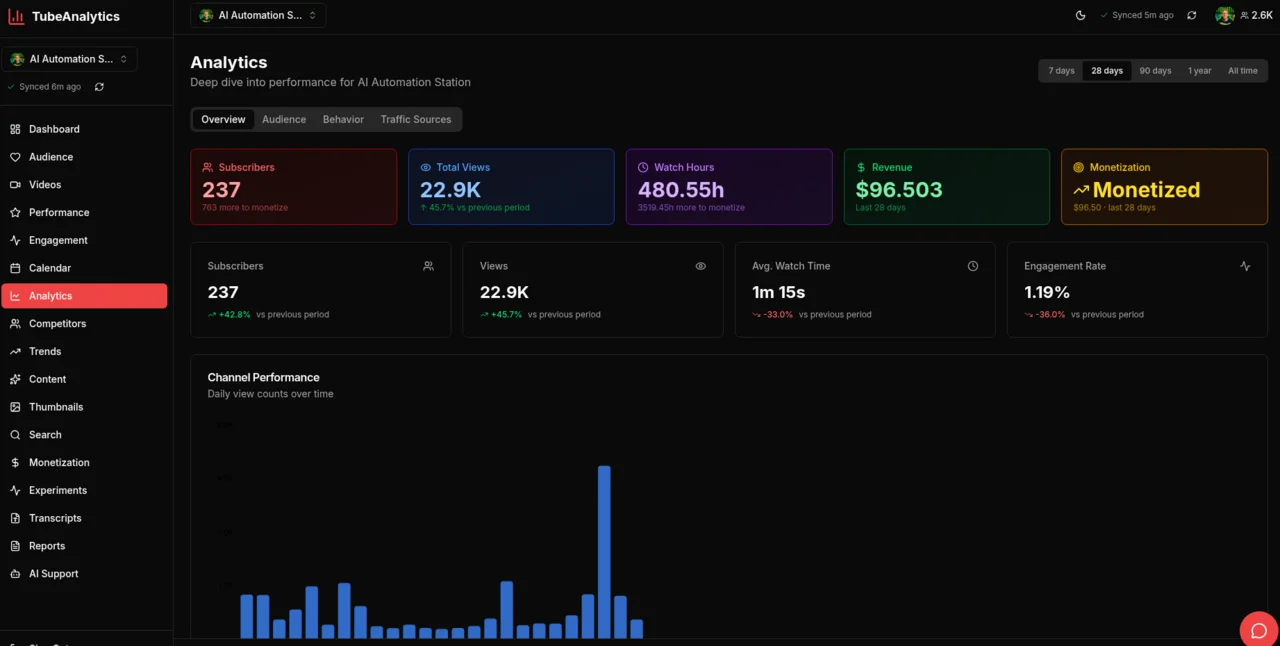
TubeAnalytics channel analytics dashboard
Product preview with sample data. Review channel performance before opening a detailed report.

What TubeAnalytics includes

ซิงค์ข้อมูลรายวัน

TubeAnalytics ซิงค์ข้อมูลช่องอัตโนมัติวันละครั้ง (01:00 UTC และประมวลผลรอบที่ 02:00 และ 04:00 UTC) เพื่อให้แดชบอร์ดของคุณแสดงข้อมูลล่าสุดที่ YouTube เปิดให้ใช้งาน

ปลอดภัยและเป็นส่วนตัว

การเข้าถึงการวิเคราะห์ รายได้ และข้อมูลเมตาเป็นแบบอ่านอย่างเดียว ขอบเขต youtube.force-ssl อนุญาตให้มีการจัดการความคิดเห็นและการเข้าถึงแทร็กคำบรรยายบนช่องที่เชื่อมต่อ TubeAnalytics ไม่สามารถเผยแพร่วิดีโอ แก้ไขข้อมูลเมตาของวิดีโอ หรือเปลี่ยนการตั้งค่าช่องได้

ข้อมูลทางประวัติศาสตร์

ความพร้อมใช้งานของข้อมูลในอดีตจะแตกต่างกันไปตามแผน: Starter มี 90 วัน, Professional มี 1 ปี และ Enterprise มีสูงสุด 5 ปี

ทำงานได้ทั่วโลก

TubeAnalytics รองรับช่องในทุกประเทศและทุกภาษาที่ YouTube รองรับ ครอบคลุมตลาดท้องถิ่นมากกว่า 100 แห่ง

TubeAnalytics กับ YouTube Studio

YouTube Studio ให้ข้อมูลวิเคราะห์พื้นฐานสำหรับช่องเดียว TubeAnalytics ขยายขอบเขตนั้นด้วยการติดตามคู่แข่ง การวิเคราะห์การสร้างรายได้ การทดสอบภาพขนาดย่อ และคุณลักษณะขั้นตอนการทำงานอื่น ๆ ที่ตอบคำถามติดตามผลได้เร็วขึ้น

FeatureTubeAnalyticsYouTube Studio
Real-time view velocity (first 48h)No
Competitor channel trackingNo
AI thumbnail visual scoringNo
Trend discovery (pre-peak)No
Engagement heatmapsNo
Revenue by geographyBasic revenue data
Audience demographicsBasic demographics
Video transcripts + downloadNo
Content calendar & schedulingNo
AI content ideasNo
Multi-channel dashboardSingle channel only
5-year data retention90 days
Comment moderation & reply inboxNo

Review the full comparison table →

Decision Answers (Question -> Answer -> Evidence)

Fast, citation-friendly answers for the most common feature-evaluation intents.

What feature set replaces YouTube Studio for serious growth workflows?

Creators typically need a stack covering retention diagnostics, competitor benchmarking, monetization analytics, and pre-publish optimization. TubeAnalytics combines those modules in one workflow-oriented platform.

Evidence

  • Feature taxonomy on this page spans analytics, audience intelligence, trend discovery, and revenue optimization.
  • The comparison block shows where YouTube Studio is limited relative to purpose-built analytics workflows.
  • Guide and blog links connected to each feature provide implementation paths beyond dashboard metrics.

Which features are most directly tied to revenue growth?

Revenue optimization, thumbnail testing, and trend discovery typically provide the fastest economic impact because they affect RPM/CPM mix, CTR, and topic demand timing.

Evidence

  • Revenue Optimization module reports CPM/RPM across geography and topic.
  • AI Thumbnail Testing provides relative visual scores, not a measured CTR or a calibrated click forecast.
  • Trend Discovery identifies rising demand windows where early publication can compound views.

What should agencies evaluate before adopting a feature platform?

Evaluate channel limits, competitor capacity, reporting/export depth, and operational support. These determine whether the platform can serve multi-client workflows without data blind spots.

Evidence

  • Pricing and plan metadata defines channel and competitor limits by tier.
  • Feature documentation includes report/export and API access capabilities.
  • Support and operational workflows are exposed across support and methodology pages.

Sources

Feature claims and definitions are grounded in official TubeAnalytics pages, published YouTube platform documentation, and the methodology links below.

Ecosystem links

Frequently Asked Questions

Common questions about TubeAnalytics features and how they work.

TubeAnalytics เชื่อมต่อกับช่อง YouTube ของฉันอย่างไร

TubeAnalytics เชื่อมต่อผ่านข้อมูล YouTube และ API การวิเคราะห์อย่างเป็นทางการของ Google การเข้าถึงการวิเคราะห์ รายได้ และข้อมูลเมตาเป็นแบบอ่านอย่างเดียว ขอบเขต youtube.force-ssl อนุญาตให้มีการจัดการความคิดเห็นและการเข้าถึงแทร็กคำบรรยายบนช่องที่เชื่อมต่อ TubeAnalytics ไม่สามารถเผยแพร่วิดีโอ แก้ไขข้อมูลเมตาของวิดีโอ หรือเปลี่ยนการตั้งค่าช่องได้ คุณสามารถตรวจสอบการอนุญาตที่ร้องขอทั้งหมดก่อนที่จะเชื่อมต่อและเพิกถอนการเข้าถึงจากบัญชี Google ของคุณได้ตลอดเวลา

การทดสอบภาพขนาดย่อของ AI ทำงานอย่างไร

คุณอัปโหลดภาพขนาดย่อ 2–4 รูปแบบ แล้ว AI ของเราจะวิเคราะห์แต่ละภาพในหลายๆ มิติ เช่น การตรวจจับใบหน้า ความสามารถในการอ่านข้อความ คอนทราสต์ของสี และองค์ประกอบ

ฉันสามารถติดตาม YouTube Shorts ด้วย TubeAnalytics ได้หรือไม่

ใช่. TubeAnalytics ติดตามวิดีโอทุกประเภท รวมถึง YouTube Shorts, วิดีโอแบบยาว, สตรีมสด และวิดีโอพรีเมียร์

ข้อมูลรายได้คำนวณอย่างไร แม่นมั้ย?

ข้อมูลรายได้จะดึงมาจาก YouTube Analytics API โดยตรง ซึ่งเป็นแหล่งข้อมูลเดียวกับที่ YouTube Studio ใช้

ฉันสามารถติดตามช่องคู่แข่งได้กี่ช่อง?

จำนวนขึ้นอยู่กับแผนของคุณ: Starter อนุญาต 5, Professional อนุญาต 10 และ Enterprise อนุญาตสูงสุด 20

TubeAnalytics มีค่าใช้จ่ายเท่าไร?

แผนเริ่มต้นที่ $19/เดือนสำหรับ Starter, $49/เดือนสำหรับ Professional และ $149/เดือนสำหรับ Enterprise

Still have questions? Browse the guide library or read the blog.

For packaging specifically, see our thumbnail design tips guide before you test creative changes.

พร้อมเลือกฟีเจอร์ที่เหมาะกับงานแล้วหรือยัง?

เริ่มจากคู่มือเริ่มต้น หรือเลือกแพ็กเกจตั้งแต่ $19 ต่อเดือน

See how TubeAnalytics measures up on industry benchmarks.