Trusted by 10,000+ YouTube creators · Updated March 2026

YouTube 分析功能可拓展您的频道

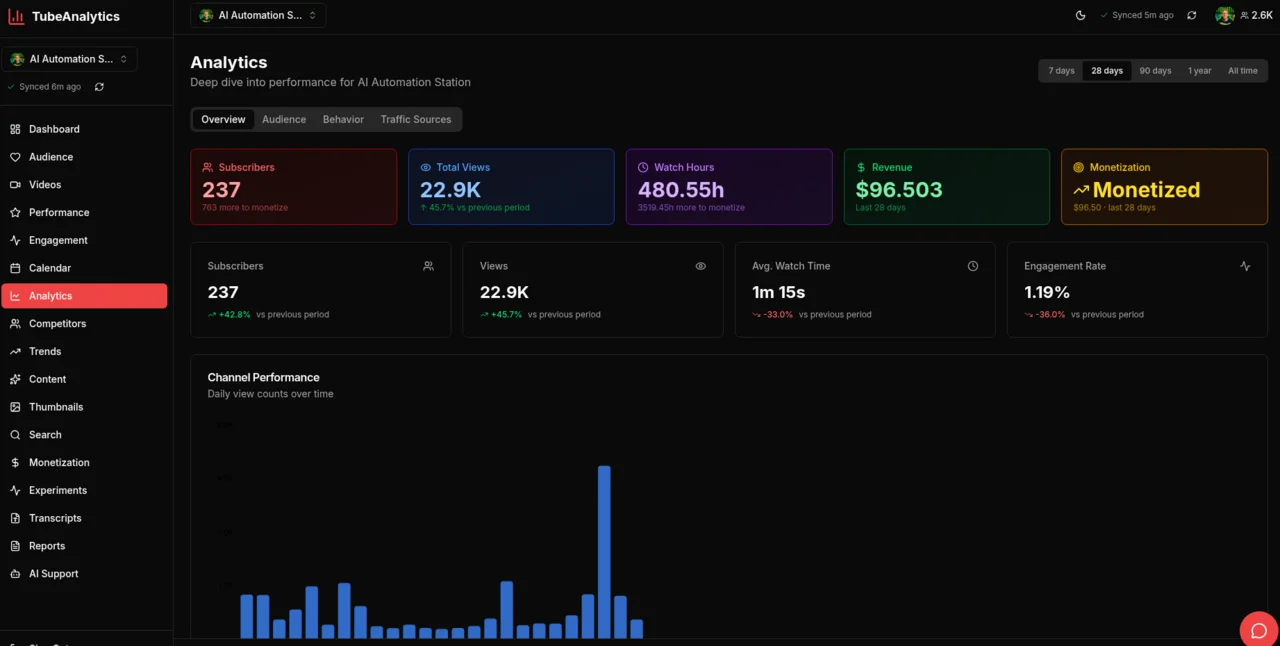
TubeAnalytics 是一个 YouTube 分析平台 - 一个数据智能套件,可帮助创作者跟踪视频表现、了解观众人口统计数据、对竞争对手进行基准测试、使用 AI 测试缩略图以及优化整个频道的收入。 For source notes and metric definitions, see our methodology and glossary.

Plans from $19/month

Last reviewed for factual accuracy on: April 21, 2026 by Mike Holp.

Starter+

Deep Video Analytics

Every metric, for every video, in one place

Know within the first 48 hours whether a video will hit your channel average — and why.

Deep Video Analytics is TubeAnalytics' video-level reporting tool that tracks view velocity, engagement heatmaps, and performance forecasting for every video on your channel. Unlike basic view counts, it shows exactly how content performs from the first hour through long-tail discovery — so you can double down on what's working and cut what isn't.

Key capabilities

In practice
  • Real-time view velocity tracking for first 48 hours
  • Engagement heatmaps showing exactly where viewers drop off
  • Performance forecasting based on historical patterns
  • Video-over-video comparison to identify what works
  • CTR tracking with historical benchmarks
  • Watch time analysis by traffic source
Starter+

Audience Intelligence

Know your viewers better than they know themselves

Upload at the right time, for the right audience, and watch your average view duration improve.

Understand who watches your content, where they come from, and what keeps them engaged. TubeAnalytics maps demographics, retention curves, geographic distribution, and interest categories to help you create content your audience loves. According to YouTube, channels that consistently match content to audience interest see 2–3× higher subscriber retention.

Key capabilities

In practice
  • Demographic breakdowns by age, gender, and location
  • Audience retention curves for every video
  • Geographic revenue analysis — see which markets are most valuable
  • New vs. returning viewer tracking
  • Peak activity heatmaps for optimal upload scheduling
  • Interest category mapping to find content opportunities
Professional+

Competitor Tracking

Learn from the market, then outperform it

Find the content gaps your competitors are missing — and fill them before they do.

Competitor Tracking is a channel benchmarking tool that monitors up to 20 YouTube channels simultaneously, surfacing upload patterns, view trends, and content gaps across your niche. A content gap is any topic, format, or keyword that competitors have not covered but audience search data suggests demand for. Channels that identify and publish on under-covered topics earn 30–50% more views on average than those competing on saturated subjects — one of the most consistent growth patterns across creator categories.

Key capabilities

In practice
  • Track up to 20 competitor channels
  • Upload cadence and consistency analysis
  • View trend comparison across channels
  • Engagement rate benchmarking
  • Content gap analysis — find topics competitors haven't covered
  • Weekly competitor activity reports delivered to your inbox
Professional+

Trend Discovery

Get ahead of the algorithm, not behind it

Publish on a rising topic 2–3 weeks early and capture the wave as it peaks.

Trend Discovery is TubeAnalytics' content intelligence module that identifies emerging topics in your niche before they peak. The platform analyzes search trends, rising keywords, and viral content patterns to surface opportunities while they're still early. Timing matters: measured across the TubeAnalytics creator network, videos published during a trend's early rise earn 40–60% more views on average than those published at peak.

Key capabilities

In practice
  • Niche-specific trend detection and alerts
  • Rising keyword identification with momentum scores
  • Viral content pattern recognition
  • Seasonal trend forecasting
  • Content idea generation based on trending topics
  • Search demand analysis for your niche
Enterprise

AI Thumbnail Testing

Stop guessing which thumbnail will perform

Test thumbnails before publishing and improve your CTR without burning impressions.

Upload thumbnail variants and let AI score their CTR potential before you publish. Our model analyzes face detection, text clarity, color contrast, and composition to predict which thumbnail will drive the most clicks. A 1% improvement in CTR can double impressions delivered by the YouTube algorithm — thumbnail decisions are among the highest-leverage choices a creator makes.

Key capabilities

In practice
  • AI-powered CTR prediction scoring
  • Face detection and expression analysis
  • Text readability scoring at thumbnail sizes (e.g., mobile)
  • Color contrast and composition analysis
  • A/B testing with statistical significance tracking
  • Historical thumbnail performance tracking
Professional+

Revenue Optimization

Maximize every view's earning potential

Shift more content toward high-CPM topics and geographies to increase revenue without more views.

Revenue Optimization is TubeAnalytics' monetization analytics module that tracks CPM, RPM, ad type performance, sponsorship revenue, and geographic revenue distribution. Get actionable recommendations to increase earnings per view and diversify income streams. Geography matters significantly: according to YouTube Creator Academy data, US, UK, and Australian viewers generate 3–5× higher CPM than viewers in most other markets.

Key capabilities

In practice
  • CPM and RPM tracking by video, geography, and time
  • Ad type performance breakdown
  • Revenue forecasting based on historical data
  • Geographic revenue optimization recommendations
  • Sponsorship and membership revenue tracking
  • Revenue per content category analysis
Professional+

Video Transcripts

Download and analyze every word

Turn one video into a blog post, a Twitter thread, and five social clips — without re-watching.

Video Transcripts gives you full, timestamped transcripts for every video on your channel — downloadable as plain text or formatted with timestamps for repurposing into blogs, newsletters, and social media. Repurposing video content into written formats can drive an additional 20–30% of traffic from Google Search, according to YouTube's own content guidance — an often-overlooked distribution channel for creators.

Key capabilities

In practice
  • Full video transcripts with timestamps
  • Download as plain text or timestamped format
  • Content repurposing for blogs and social media
  • SEO keyword research from your own content
  • Word count and character statistics
  • Batch transcript processing
Enterprise

SEO Tools

Get discovered in YouTube search

Rank for the keywords your audience is actively searching — before your competitor does.

Optimize your videos for YouTube search with keyword research, tag suggestions, and SEO scoring. Understand what viewers are searching for and tailor your content to match demand. YouTube is the second-largest search engine in the world, according to Comscore and Alexa historical data, and organic search traffic converts to subscribers at significantly higher rates than suggested feed traffic.

Key capabilities

In practice
  • Keyword research and search volume data
  • Tag suggestions based on top performers
  • SEO scoring for video titles and descriptions
  • Competitor keyword analysis
  • Trending search terms in your niche
  • Optimization recommendations with actionable steps
Starter+

Content Calendar

Plan, schedule, and visualize your content

Publish on a consistent schedule and signal to the algorithm that your channel is active.

Plan your content strategy with a visual calendar. See your upcoming videos, track upload schedules, and maintain consistency with a clear overview of your content pipeline. YouTube's own Creator Academy recommends consistent upload schedules as one of the top factors in sustained channel growth.

Key capabilities

In practice
  • Visual calendar view of scheduled content
  • Drag-and-drop scheduling
  • Upload date reminders
  • Content type categorization
  • Consistency tracking and analytics
  • Multi-channel calendar support
Enterprise

AI Content Ideas

Never run out of content ideas

Generate a month of video ideas in minutes — tailored to your niche and your audience's interests.

Get AI-powered content recommendations tailored to your channel. Generate video ideas, titles, descriptions, and outlines based on trends, audience interests, and successful formats. The AI is trained on your channel's historical performance, so suggestions are grounded in what your specific audience responds to.

Key capabilities

In practice
  • AI-generated video ideas based on your channel trends
  • Title and description suggestions with SEO scoring
  • Audience interest analysis
  • Trending topic recommendations
  • Content format suggestions (tutorial, reaction, list, etc.)
  • Script outline generation
Professional+

Viral Script Generator

Write scripts that keep viewers watching

Go from blank page to a fully structured, retention-engineered script in under two minutes.

The Viral Script Generator uses GPT-4.1 to write complete YouTube video scripts built on proven virality frameworks — the same psychological structures used by MrBeast, Veritasium, and Ali Abdaal. Every script is structured to maximise average view duration, click-through rate, and engagement signals: the three metrics YouTube's algorithm rewards most. Fill in your topic, audience, niche, tone, and hook style, and receive a professionally structured script streamed in real time, section by section.

Key capabilities

In practice
  • 8 structured sections: Hook, Peak Interest, Build-Up, Body, Pattern Interrupt, Proof, Recap, CTA
  • 5 tone options: Conversational, Authoritative, Entertaining, Inspirational, Controversial
  • 7 hook styles including Curiosity Gap, Shocking Stat, Bold Claim, and Contrarian
  • Optimised for Short (3–5 min), Medium (8–12 min), and Long (15–20 min) videos
  • Real-time streaming output — watch your script write itself section by section
  • Copy by section or copy the full script in one click
Starter+

AI Support Assistant

Get instant answers to your questions

Ask any question about your channel data and get a plain-English answer in seconds.

The AI Support Assistant is a context-aware analytics chatbot that answers channel-specific questions using data from your connected YouTube account. Unlike generic AI assistants, it has access to your video performance history, audience demographics, and revenue data — enabling personalized recommendations grounded in your actual metrics. Response time is instant, compared to support ticket wait times that average 24–48 hours across the SaaS industry.

Key capabilities

In practice
  • Instant answers to analytics questions
  • Personalized recommendations based on your data
  • Performance insights and improvement tips
  • Strategy advice grounded in your channel history
  • 24/7 availability — no waiting for support tickets
  • Context-aware responses that know your channel
Starter+

Video Performance Scores

Score every video's performance at a glance

Identify your top 20% of videos and replicate the patterns that made them successful.

Video Performance Scores is TubeAnalytics' video scoring module that assigns a composite performance score to every video on your channel, relative to your channel's historical average. Scores are calculated across four metrics: click-through rate (CTR), average view duration (AVD), engagement rate, and subscriber conversion rate. The 80/20 rule applies strongly on YouTube: for most channels, 20% of videos drive 80% of total views — making it critical to identify and replicate the patterns of your top-performing content.

Key capabilities

In practice
  • Overall performance scoring relative to your channel average
  • Engagement score breakdown (CTR, AVD, likes, comments)
  • CTR and retention analysis with context
  • Video-over-video comparison
  • Historical score tracking over time
  • Improvement recommendations per video
Enterprise

Topic Experiments

Test content topics with data-driven experiments

Discover which content categories drive the most subscribers — not just views — for your channel.

Run controlled experiments on your content topics to identify what drives the most growth. Compare topic performance across revenue, watch time, subscribers, and reach to optimize your content strategy. What drives views isn't always what drives subscribers or revenue — this feature separates those signals clearly.

Key capabilities

In practice
  • AI-powered topic clustering from your video library
  • A/B testing framework for content topics
  • Multi-metric performance comparison (views, subs, revenue, watch time)
  • Statistical significance tracking
  • Growth attribution modeling
  • Experiment recommendations based on your goals
Professional+

Comment Manager

Moderate and reply to comments without leaving your dashboard

Respond to every comment in one inbox instead of juggling YouTube Studio tabs — and keep spam off your channel automatically.

Manage your entire comment section from inside TubeAnalytics. View comments across all videos in a unified feed, reply directly, approve or hold comments for review, mark spam, and delete unwanted posts — all without switching to YouTube Studio. Filter by moderation status to triage held-for-review comments quickly, or search for specific threads. Creators who respond to comments within 24 hours consistently see higher algorithmic reach because YouTube treats engagement as a signal of an active community.

Key capabilities

In practice
  • Unified comment inbox across all your videos
  • Reply directly from the dashboard
  • Approve, hold for review, mark as spam, or delete
  • Filter by moderation status (all, approved, held, spam, rejected)
  • Full-text search across all comment threads
  • Infinite scroll feed — no pagination clicking

Built for serious creators

实时数据

TubeAnalytics 每小时同步频道数据,确保性能指标反映最近 60 分钟的观看者活动窗口。

安全且私密

TubeAnalytics 使用由 Google OAuth 的明确范围审查强制执行的只读 YouTube API 访问权限。

史料

历史数据可用性因计划而异:Starter 包括 90 天,Professional 包括 1 年,Enterprise 包括长达 5 年。

全球运作

TubeAnalytics 支持 YouTube 支持的所有国家/地区和所有语言的频道,覆盖 100 多个本地市场。

TubeAnalytics 与 YouTube Studio

YouTube Studio 为单个频道提供频道基线分析。 TubeAnalytics 通过 YouTube Studio 不提供的 13 项功能对此进行了扩展。

FeatureTubeAnalyticsYouTube Studio
Real-time view velocity (first 48h)Hourly view velocity trackingNo
Competitor channel trackingUp to 20 channels (Pro/Enterprise)No
AI thumbnail CTR predictionPre-publish scoring (Enterprise)No
Trend discovery (pre-peak)Niche trend alerts (Pro/Enterprise)No
Engagement heatmapsViewer drop-off visualizationNo
Revenue by geographyCPM/RPM by country + ad typeBasic revenue data
Audience demographicsFull demographics + retention curvesBasic demographics
Video transcripts + downloadTimestamped transcript downloadNo
Content calendar & schedulingVisual calendar + remindersNo
AI content ideasAI recommendations (Enterprise)No
Multi-channel dashboardUp to 5 channels (Enterprise)Single channel only
5-year data retention5 years on Enterprise90 days
Comment moderation & reply inboxFull inbox + spam filteringNo

See full comparison with other analytics tools →

Decision Answers (Question -> Answer -> Evidence)

Fast, citation-friendly answers for the most common feature-evaluation intents.

What feature set replaces YouTube Studio for serious growth workflows?

Creators typically need a stack covering retention diagnostics, competitor benchmarking, monetization analytics, and pre-publish optimization. TubeAnalytics combines those modules in one workflow-oriented platform.

Evidence

  • Feature taxonomy on this page spans analytics, audience intelligence, trend discovery, and revenue optimization.
  • The comparison block shows where YouTube Studio is limited relative to purpose-built analytics workflows.
  • Guide and blog links connected to each feature provide implementation paths beyond dashboard metrics.

Which features are most directly tied to revenue growth?

Revenue optimization, thumbnail testing, and trend discovery typically provide the fastest economic impact because they affect RPM/CPM mix, CTR, and topic demand timing.

Evidence

  • Revenue Optimization module reports CPM/RPM across geography and topic.
  • AI Thumbnail Testing targets click-through performance before publishing.
  • Trend Discovery identifies rising demand windows where early publication can compound views.

What should agencies evaluate before adopting a feature platform?

Evaluate channel limits, competitor capacity, reporting/export depth, and operational support. These determine whether the platform can serve multi-client workflows without data blind spots.

Evidence

  • Pricing and plan metadata defines channel and competitor limits by tier.
  • Feature documentation includes report/export and API access capabilities.
  • Support and operational workflows are exposed across support and methodology pages.

Sources

Feature claims and definitions are based on official TubeAnalytics pages and published YouTube platform documentation.

Frequently Asked Questions

Common questions about TubeAnalytics features and how they work.

TubeAnalytics 如何连接到我的 YouTube 频道?
TubeAnalytics 使用只读 OAuth 访问通过 Google 官方 YouTube 数据 API 和 YouTube Analytics API 进行连接。我们从不请求发帖权限。
AI缩略图测试如何进行?
您上传 2-4 个缩略图变体,我们的人工智能会从多个维度分析每一个:面部检测、文本可读性、颜色对比度和构图。
我可以使用 TubeAnalytics 跟踪 YouTube Shorts 吗?
是的。 TubeAnalytics 跟踪所有视频类型,包括 YouTube Shorts、长视频、直播和首映。
收入数据是如何计算的?准确吗?
收入数据直接从 YouTube Analytics API 中提取,这与 YouTube Studio 使用的数据源相同。
我可以跟踪多少个竞争对手渠道?
数量取决于您的计划:Starter 允许 5 个,Professional 允许 10 个,Enterprise 允许最多 20 个。
TubeAnalytics 的费用是多少?
入门级套餐起价为 19 美元/月,专业级套餐起价为 49 美元/月,企业级套餐起价为 149 美元/月。

Still have questions? Browse our guides or read the blog.

准备好以不同的方式看待您的频道了吗?

加入 10,000 多名使用 TubeAnalytics 做出数据驱动的内容决策的创作者行列。从我们的入门指南开始,或者从每月 19 美元起的计划开始。