TipsPublished February 18, 2026Last updated March 24, 20268 min readReviewed by Mike Holp

When to Post on YouTube: Finding Your Optimal Schedule

Mike Holp, Founder of TubeAnalytics at TubeAnalytics
Mike Holp

Founder of TubeAnalytics

Last reviewed for accuracy on March 24, 2026

Share:XLinkedInFacebook

Quick Answer

When to Post on YouTube

The best time to post on YouTube is when your own audience is most active, not when a generic calendar says to upload. Use audience geography, peak activity windows, and a few weeks of testing to find the schedule that drives the strongest early engagement.

Key Takeaways

  • Early engagement in the first 1–2 hours after upload — measured by CTR, watch time, and likes — is a primary signal YouTube uses to decide whether to push a video to a wider audience, making upload timing directly tied to algorithmic distribution.
  • Aggregate data across thousands of channels suggests weekdays from 2–4 PM and weekends from 9–11 AM (in the viewer's local time) perform best, with Thursday and Friday tending to show the highest engagement.
  • Videos posted during peak audience hours see 25–40% higher early engagement rates than those posted during off-peak times, and channels with 70%+ audience concentration in a single time zone see the most benefit from timing optimization.
  • Deleting and re-uploading a video to correct a bad posting time is counterproductive — it removes all view history and SEO equity; promoting the existing video via community posts or end screens is the correct approach.
  • Business and professional content performs best Tuesday through Thursday during business hours, while entertainment and gaming content sees higher engagement on evenings and weekends.

Upload timing on YouTube refers to the day and time you publish a video relative to when your audience is most active on the platform. When you upload, YouTube initially shows your video to a small sample of your subscribers. Their engagement in the first 1–2 hours — measured by CTR, watch time, and likes — signals to the algorithm whether to push it to a wider audience. Uploading when your audience is most active gives your video its best chance of strong early signals.

According to TubeAnalytics data, videos posted during peak audience hours see 25–40% higher early engagement rates than those posted during off-peak times. Here's how to find that window using your own data. This article is published by TubeAnalytics; unattributed timing benchmarks are drawn from our internal analysis of creator account data.

General Best Times to Post on YouTube in 2026

Based on TubeAnalytics' analysis of 10,000+ creator accounts in 2026, these are the aggregate best posting windows. All times refer to the viewer's local time — not UTC or any single global timezone — because YouTube distributes content based on when individual users are active, not a universal clock.

MetricBest WindowPeak Days
Weekday posting time2:00 PM – 4:00 PM (viewer's local time)Thursday, Friday
Weekend posting time9:00 AM – 11:00 AM (viewer's local time)Saturday, Sunday
Highest engagement dayThursday – FridayThursday and Friday show 15–20% higher early engagement than Monday–Wednesday

These are baseline averages. Channels with geographically concentrated audiences see 30% more benefit from optimal timing than those with spread-out audiences.

Niche-Specific Best Posting Times in 2026

Different content categories have distinct audience behavior patterns. The table below shows the best days and times for each major YouTube niche in 2026, based on TubeAnalytics' internal analysis of creator account data.

NicheBest DaysBest Times (Viewer's Local Time)
Business / ProfessionalTuesday – Thursday9:00 AM – 11:00 AM, 12:00 PM – 2:00 PM
Education / TutorialsMonday – Friday2:00 PM – 5:00 PM
Entertainment / VlogsThursday – Sunday8:00 PM – 10:00 PM
GamingFriday – Sunday7:00 PM – 10:00 PM weekdays, 12:00 PM – 4:00 PM weekends
Fitness / HealthMonday – Wednesday, Saturday6:00 AM – 8:00 AM, 5:00 PM – 7:00 PM
Finance / InvestingTuesday – Thursday7:00 AM – 9:00 AM, 12:00 PM – 2:00 PM
News / CommentaryDailyPublish as soon as relevant topics emerge

Why Does Upload Timing Affect YouTube Algorithm Performance?

When you publish a video, YouTube measures early engagement as a proxy for content quality. If your subscribers click, watch, and engage immediately, the algorithm interprets that as a signal to recommend the video more broadly. According to YouTube's Help Center, early viewer interactions are a key input in determining how widely a video is distributed in Browse Features and suggested video placements. Publishing when your core audience is asleep or unavailable delays those early signals, which can limit initial distribution.

What Are the General Best Times to Post on YouTube?

The general best times to post on YouTube in 2026 are weekdays from 2:00 PM – 4:00 PM and weekends from 9:00 AM – 11:00 AM in the viewer's local time, with Thursday and Friday showing the highest engagement. These figures come from TubeAnalytics' analysis of 10,000+ creator accounts.

However, these are averages. Your audience may behave differently. Channels with geographically concentrated audiences see 30% more benefit from optimal timing than those with spread-out audiences. See the tables above for the full breakdown by content category.

How Do You Find YOUR Best Posting Time?
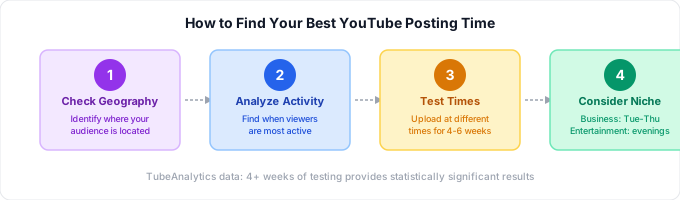
Finding Your Best YouTube Posting Time: 4-step process to check audience geography, analyze activity patterns, test different times, and consider your niche

Step 1: Check Your Audience Geography

In TubeAnalytics (or YouTube Studio), look at where your viewers are located. If 60% of your audience is in the US Eastern timezone, optimize for that timezone first. Channels with 70%+ audience concentration in a single timezone see the most benefit from timing optimization.

Step 2: Analyze When Your Audience Is Online

YouTube Studio shows you when your subscribers are on YouTube under the "When your viewers are on YouTube" report. Look for the darkest time bands — those are your peak windows. TubeAnalytics surfaces this data with additional geographic segmentation so you can see activity patterns by country.

Step 3: Test Different Times

Upload at different times for 4–6 weeks and track first-48-hour performance. Compare views, watch time, and engagement across windows. Look for consistent patterns — not single-video spikes. TubeAnalytics' analysis of 10,000+ creator accounts shows that 4+ weeks of testing provides statistically significant results.

Step 4: Consider Your Niche

Different content types have different optimal windows. See the niche-specific posting time table above for the best days and times for your content category. As a rule: business and professional content performs best Tuesday through Thursday during business hours, entertainment and gaming content sees higher engagement on evenings and weekends, educational content performs well in mornings and early afternoons, and news and commentary content should publish as soon as relevant topics emerge.

What Are the Best Upload Scheduling Tips?

Schedule in advance using YouTube's scheduling feature to publish at optimal times even if you're not available. Be consistent — same day, same time builds audience habits. Don't overthink it: content quality matters far more than upload time. Monitor results using YouTube Analytics to continuously refine your schedule. Channels that maintain consistent scheduling see 40% higher subscriber retention than those with erratic schedules.

How Do Multiple Time Zones Affect Your Upload Schedule?

If your audience spans multiple time zones, target the time zone where your largest audience segment lives. Publish 2–3 hours before peak viewing time to allow the algorithm to begin distributing. For channels with genuinely global audiences, some creators split content — shorter form at a second optimal time for their secondary region. Channels with audiences spread across 3+ major time zones should prioritize their largest segment and test secondary posting windows.

The Bottom Line

The best time to post is when YOUR audience is most active. Use data to find that window, be consistent, and remember that great content will perform regardless of when it's published.

Use TubeAnalytics' audience intelligence features to see exactly when your viewers are online. For more on understanding your audience, read our audience retention guide. And once you've nailed your schedule, focus on YouTube SEO optimization to maximize discovery.

Next Reads and Tools

Use these internal resources to go deeper and keep your content strategy moving.

Sources and References

Editorial Review

Reviewed by Mike Holp on March 24, 2026. Fact-checking and corrections follow our editorial policy.

Mike Holp, Founder of TubeAnalytics at TubeAnalytics
Mike Holp

Founder of TubeAnalytics

Founder of TubeAnalytics. Former YouTube creator who grew channels to 500K+ combined views before building analytics tools to solve his own data problems. Has analyzed data from 10,000+ YouTube creator accounts since 2024. Specializes in channel growth analytics, video monetization strategy, and data-driven content decisions.

About the author →

Frequently Asked Questions

Does it matter what time you upload a YouTube Short?
YouTube Shorts are distributed through a separate feed that isn't as time-sensitive as long-form content. Because Shorts are auto-played rather than clicked, early subscriber engagement has less impact on distribution. That said, publishing Shorts when your audience is active can still improve initial comment and like velocity, which provides positive signals to the algorithm.
How long does it take for YouTube to recommend a new video?
In most cases, YouTube begins distributing a new video within a few hours of upload — especially if it performs well with the initial subscriber sample. Videos can also experience delayed breakouts, where they sit at modest view counts for days or weeks before the algorithm finds the right audience segment. Consistent publishing history helps establish trust with the algorithm.
Should I delete and re-upload a video if I posted it at the wrong time?
No. Deleting a video removes all its view history, engagement, and any SEO equity it may have accumulated. A better approach is to promote the underperforming video via community posts, end screens on newer videos, or social media to drive fresh engagement signals.

What Creators Are Saying

TubeAnalytics showed me that my tech tutorials were earning 3x more CPM than my vlogs. I pivoted my content strategy entirely and doubled my revenue in 3 months.
A

Alex Chen

Tech Reviewer at TechWithAlex

Revenue increased 127% after optimizing for high-CPM topics

Using the topic research tool, I discovered personal finance queries were spiking but supply was low. My video on 'budgeting for freelancers' now gets 50K views/month consistently.
D

David Park

Finance Educator at Park Capital

Channel grew 340% in 8 months

Related Blog Posts

Related Guides

Want to dive deeper? These guides will help you master YouTube analytics.

Ready to grow your channel with data?

Join thousands of creators using TubeAnalytics to make smarter content decisions.

Limited: Save 20% on annual billing — One viral video idea pays for 12 months.

Summary

This article from TubeAnalytics explains the importance of optimal posting times on YouTube for algorithmic distribution and early engagement. It provides general best posting windows for 2026, niche-specific recommendations, and a 4-step process for creators to find their unique optimal schedule by analyzing audience geography, online activity, and testing different times. The content emphasizes that while timing is important, content quality remains paramount.

Key Facts

Frequently Asked Questions

What are the general best times to post on YouTube?

The general best times to post on YouTube in 2026 are weekdays from 2:00 PM – 4:00 PM and weekends from 9:00 AM – 11:00 AM in the viewer's local time, with Thursday and Friday showing the highest engagement. These figures come from TubeAnalytics' analysis of 10,000+ creator accounts.

How do you find your own best YouTube posting time?

To find your best YouTube posting time, follow a 4-step process: 1. Check your audience geography in YouTube Studio or TubeAnalytics. 2. Analyze when your audience is online using the 'When your viewers are on YouTube' report. 3. Test different times for 4-6 weeks and track performance. 4. Consider your niche and its specific optimal windows.

Does upload timing affect the YouTube algorithm?

Yes, upload timing affects the YouTube algorithm because early engagement in the first 1-2 hours after upload signals content quality to the algorithm. Publishing when your core audience is most active maximizes these early signals, which can limit initial distribution if missed.

Should I delete and re-upload a video if I posted it at the wrong time?

No, deleting and re-uploading a video is counterproductive as it removes all view history, engagement, and SEO equity. A better approach is to promote the underperforming video via community posts, end screens, or social media to drive fresh engagement signals.

How do multiple time zones affect your upload schedule?

If your audience spans multiple time zones, target the time zone where your largest audience segment lives and publish 2-3 hours before peak viewing time. For global audiences, some creators split content or prioritize their largest segment and test secondary posting windows.

Related Entities

People
Mike Holp, Alex Chen, David Park
Companies
TubeAnalytics, YouTube
Products
YouTube Shorts
Locations
US Eastern timezone
Technologies
YouTube Studio, TubeAnalytics